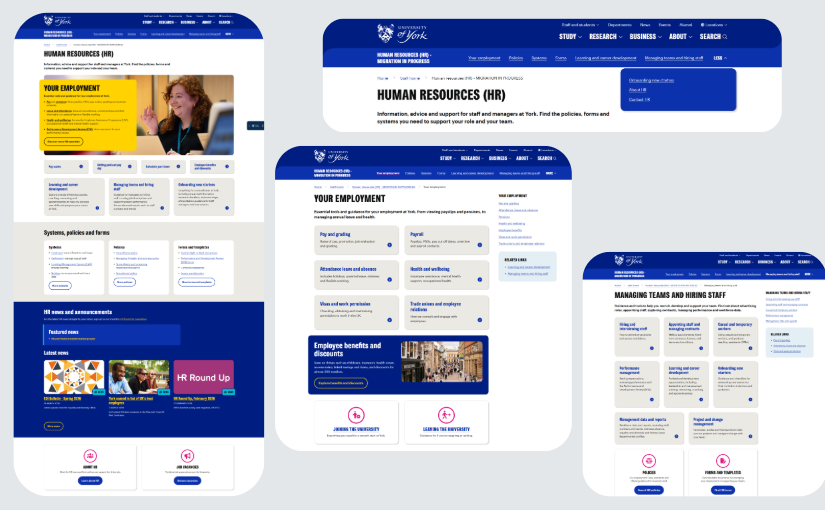
Over the past few months, we’ve been working on migrating the HR web pages from a legacy system (Dreamweaver) and into the main University website and our central web content management system (CMS). Having the HR content within the CMS will mean it’s easier to maintain and better aligned with our wider University website, brand and key content for staff.
The new pages went live on 15 April and they live in the main york.ac.uk/staff branch.
Help us improve the pages
Whether you’ve spotted an error or have ideas for future content, we’d love to hear from you.
This short survey takes just a few minutes to complete. We’ll review your comments as part of our post-live checks.
Lift-and-shift approach
Here is a quick overview of the project and the key changes.
To help migrate the pages swiftly, efficiently and within the resource constraints, a bronze ‘lift-and-shift’ approach was agreed. This means we have not redeveloped the content, rewritten or edited text, so the content remains the same as on the original pages. The old HR web pages were in good shape to enable us to take this approach. This means that both the content and structure are broadly the same, but with some targeted improvements to enhance the user experience.
This approach also means the new site can be delivered within the HR and Finance Transformation project timeline. Getting the content into the CMS now means it will be easier to make further changes once the benefits from Workday are known and need to be integrated into HR’s evergreen web content about processes and policies.
Targeted improvements
Streamlined navigation
We’ve decluttered the navigation menu to enhance usability and content discoverability. In keeping with the bronze ‘lift-and-shift’ approach, we’ve refined the existing site structure and content organisation, rather than undertaking a complete information architecture overhaul or re-categorisation from scratch. The site now has nine main sections (rather than 19). There are two new high-level category sections ‘Your employment’ and ‘Managing teams and hiring staff’ grouping existing sections.

New HR main page
We’ve redesigned the HR landing page to serve as the main entry point to the new site structure, ensuring staff can quickly access key content areas and stay up-to-date via a dedicated news feed.

Your employment – resources for working at York
The ‘Your employment’ section brings together core HR-related information and processes directly relevant to individual employees and their most frequent HR interactions, making it highly intuitive. It includes signposting for starters and leavers and core working at York information applicable to all staff, such as:
- Pay and grading
- Pensions
- Attendance, leave and absence
- Health and wellbeing
- Visas and work permission
- Trade unions
- Benefits and discounts.

Managing teams and hiring staff – aimed at managers
The ‘Managing teams and hiring staff’ section is specifically designed to centralise resources for managers, team leaders and those involved in the hiring process. It provides a dedicated and streamlined pathway for managers to find the tools and guidance they need.

Several high traffic and distinct sections remain top-level to ensure immediate and direct access to our most frequently sought-after information and action-oriented tools. These include:
- Policies
- Forms
- Systems
- Learning and career development
- New starter guidance (for staff and managers).
For policies, we have used a searchable and filterable table.

Migration process
If you’re interested in how we tackled the migration, here’s a run-down of the preparation and migration workflow, and a summary of what’s coming up next.
Planning
The page count has been reduced from over 1,200 pages to ~700 pages. This is how we got there:
- Content audit phase – A list of all the current pages was created and HR colleagues reviewed which pages needed to remain or be deleted.
- Developed high-level information architecture – As covered above we developed an improved top-level navigation to reduce clutter.
- Created a full sitemap for the migration – We then used the content audit and new navigation structure to map the hierarchy for every page, mapping old URIs to new page paths. The sitemap was then shared with HR colleagues for approval.
- Created and tested a content importer tool – Our amazing web developer Nick created a tool that saved us so much time. This powerful tool was able to take the sitemap spreadsheet, create these pages in the CMS and then import content from the existing HR site and into the CMS for us to tidy up.
Migration workflow
- Migration team – Pulled together a team of seven content editors from within Comms and one from HR (two people worked on this full-time and everyone else part-time).
- Tracking – Created a mega tracking sheet to help organise and keep track of the work.
- Automated migration – Migrated the pages from the HR site into our Web CMS using the sitemap spreadsheet to generate the page hierarchy.
- Checked every single page – Re-added all the essential elements (links, documents, media, and contact detail boxes) and added relevant related links and navigation where required.
- Formatting – Made light-touch text formatting and style guide changes.
- Quality assurance – Ran a second stage of quality assurance to check everything had been completed and that links were working.
- User testing – Carried out light-touch user testing of the homepage and main navigation, followed by minor quick-fix changes.
- Light-touch stakeholder review – Shared the pages with HR for a light-touch sense check and review.
- Go-live planning and publishing – As all the links have changed, go-live planning included a large redirect mapping exercise involving over 1,000 redirects.
What’s next
- Post-live checks and mop up tasks – Checking for any issues that need to be addressed, such as broken links or misspellings and adding more meta descriptions.
- Content governance – Working with HR colleagues on a content governance plan to ensure roles and responsibilities for content maintenance.
Leave a Reply