How to celebrate Global Accessibility Awareness Day (GAAD) when we’re in the middle of assessments here at the University of York? Do it a week earlier when everyone can participate!
Montage of images showing various activities that took place on UAAD.
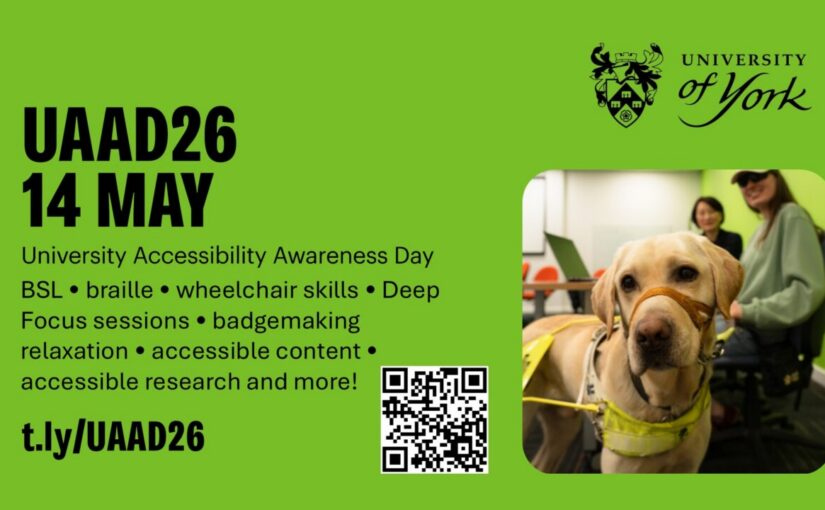
14 May saw us celebrating our inaugural University Accessibility Awareness Day (UAAD). We were excited to have Pro-Vice-Chancellor Professor Kiran Trehan start the day for us as the senior sponsor of our Disability Inclusion Framework at the University. Not only did she deliver a heartfelt and inspiring speech, she persuaded our Vice-Chancellor, Professor Charlie Jeffrey, to come along and share his thoughts about the importance of accessibility inclusion at the university. Thank you, Charlie and Kiran, for showing your support!
Our aim was to ‘grow accessibility awareness’ at the university by sparking conversations and celebrating the good work happening across campus. It was easy bringing the programme together as there is so much good work to showcase. If a small group can do this in 12 weeks, imagine what we can do with more organising volunteers and a full year to plan for next year’s event!
This year’s event was organised by members from the e-Accessibility Working Group and the EDI Office. The diverse and varied programme speaks for itself and we’re so grateful to the following organisations and external speakers for running or sponsoring workshops and sessions for all participants on the day:
All our staff and student speakers and hosts of each session deserve a round of applause as well for sharing their time, knowledge and skills. Our Student Union, Student Hub, Comms team, AV and Facilities team were likewise essential partners for a successful day.
While you’re waiting for next year’s event, read about the University’s progress in the last year on digital accessibility in Richard Walker’s annual blog post on GAAD.
We have another guest blog – Niamh Malone and Isabella Brinton, two of the wonderful interns from the Disability Inclusion Toolkit project, reflect on the process of creating the toolkit and their experiences creating it, introduced by Dr Alexander Reid, project lead:
The ‘Including Disabled People in Research’ Toolkit is a resource to support and equip researchers, across all disciplines, with guidance to make their research practices more inclusive and accessible to disabled people. It was created by a team of staff and students who had lived experience of disability and a genuine passion for enhancing accessibility with the aim of offering useful, practical and evidence-based guidance rooted in both lived experience and academic research. This blog post, written by one of the postgraduate student interns, Niamh, with comments from one of the undergraduates, Isabella, will be a reflection on the experience of creating the toolkit and will hopefully encourage you to go and take a peek at our work.
The toolkit project was borne out of the recognition that many people involved in research are well intentioned, and want to improve their practices regarding inclusion, but may not necessarily know where or how to start. Matched funding to develop such a resource was generously provided by the Equality, Diversity, and Inclusion (EDI) Research Center and the Valuing Voices for Equitable and Responsible Research team, both initiatives with a heavy focus on inclusivity that have been developed at the University of York.
From this, an inclusive recruitment process took place, which focused on the desires and passions of applicants as opposed to just their pre-existing qualifications. From the intern perspective, this focus was made clear through the recruitment experience as Isabella recalled during her reflections on her initial interaction with the project. “I first heard about the Toolkit project and the internship through my Department newsletter. The description of the project highlighted the ambition to improve disability accessibility within research, and this quickly resonated with me. Both due to personal experience, as well as previously working as a Special Educational Needs and Disabilities (SEND) Teaching Assistant, this was an area that I knew I was both passionate about and qualified for. Although I study English, I have also always enjoyed STEM, and so this opportunity to research, collect and work with data, as well as having a real-world impact, struck me as an exciting and meaningful opportunity to embark on. I sent in my application and was quickly invited to interview”.
Similarly to Isabella, I found the project through a weekly newsletter from my Department and I was drawn to the project due to how it aligned with both my personal and professional ambitions as a disabled individual conducting a PhD in disability heritage. Following the initial call for applicants the interview process was carried out. For many of the undergraduate interns, this was their first experience being interviewed for a job. Isabella remembers being nervous but that her “nerves were vastly helped by Alex and Mandy (who were interviewing me) sharing information about themselves in advance, as well as the questions, so that I felt not only more prepared, but familiar with them. The interview itself was a welcoming and supportive space, where I was asked to share not only my relevant experience, but what I thought was important about disability accessibility. My initial fear quickly subsided, and it became an opportunity to share opinions on a topic I was very passionate about.”Once again, passion can be found at the forefront of intern experience. It was the passion I felt from Lilian and Alice who interviewed me that solidified in my mind that I would accept the position when it was offered.
As a result of this open and inclusive approach to recruitment, the initial project had seven student interns (two postgraduate leaders and five undergraduates) henceforth referred to as the student team, each from a different department, and each of whom brought their own unique lived experience of disability to the project. An additional postgraduate intern,
A d/Deaf PhD student Poppy Fynes, was consulted at a later point in the project where she contributed advice on working with d/Deaf individuals. Each intern had their own strengths and interests which became clear from our initial meetings, and the student team consequently decided to divide and delegate work according to this.
The student team was also given the freedom to decide how they would like to communicate outside of staff based discussions. This is one of the many examples of best practice which can be taken from this project. By having the freedom to choose communication styles we could ensure that all of the interns’ needs were met and that there was a common language understood by everyone, something which was especially important when working in a diverse team from different disciplinary and work experience backgrounds. For example, we clarified exactly what was meant by something being needed by the “end of the day” (EOD), when we would use the slack vs a student team only Whatsapp chat, and how we would communicate if, for whatever reason, we did not have the capacity to complete something which was asked of us. For us, this looked like sending a message of a spoon emoji (🥄) to the chat as a reference to the spoon analogy for energy management for chronically ill individuals (Miserandino, 2003). Again, this is something which I would highlight as an example of best practice and a system it would be useful to incorporate into other research projects.
The first step of the data collection was a literature review, designed and conducted by the student team. To begin with, each member did a sweep of the literature within their own disciplines and areas of interest before reporting this back to the team. Through this exercise the interns learnt skills which will help them through their academic careers such as how to efficiently summarise and understand large volumes of text, and how to use a shared Paperpile for reference management.
The main outcome of the literature was the distillation of four key themes:
Accessibility,
Differing practice amongst disciplines in Higher Education,
Intersectionality and identity, and
Agency and activism.
Detailed explanations of each of these themes and how they relate to research can be found in the Toolkit (specifically, in section 2). For the sake of brevity in this blog post, I will say that these themes formed the basis for the questions we developed for our semi-structured interviews, a method suggested by the staff team and agreed upon by the student team as the best way to ensure that we could retain focus on our overarching research aim, to provide guidance to improve accessibility in research projects, whilst also allowing the discussion to be guided by disabled voices.
Half of the student team worked on the interviews while the other half worked on developing a survey in the online software Qualtrics, another method suggested by the staff team and agreed upon by the student team to ensure that we had a breadth of data to support the depth of data we collected through the interviews. The survey questions were developed in tandem with the interview questions and were shaped by the same four core themes pulled from the literature review.
The interviews were conducted exclusively by the undergraduate student interns. This decision was made to ensure that each undergraduate had the opportunity to develop their confidence and experience with the research skills involved with conducting interviews to aid in potential future research jobs or career opportunities they may wish to engage with. This is another example of how best practice was implemented in this project. Those with lived experience of disability who are engaged in research projects, at least partially due to this perspective, should leave said projects having experienced tangible self-improvements, for example having learnt new relevant skills and being financially compensated for their embodied knowledge, both things that the interns on this project received.
Conducting interviews formed a substantial element of the undergraduate interns experience of working on the toolkit. They approached the process with “interest and excitement” but also feeling a “great deal of responsibility in listening through and understanding people’s stories”. Despite the initial trepidation they ultimately concluded that “conducting the interviews was a very rewarding opportunity”. In addition to acknowledging the value that the data would add to the toolkit as it “drew our attention to aspects which hadn’t been considered previously during the literature review” it also impacted on the interns personally. “Not only did the interviews provide invaluable information and data to support the creation of the Toolkit, the experience of conducting them reinforced my passion and the importance of accessibility, highlighting the real-world, everyday impact on so many people’s lives”.
Unfortunately, funding for the undergraduate student interns was more limited and their time on the project ended before the analysis was conducted and therefore the two postgraduate student leaders did this portion of the analysis. One of the interns conducted statistical analysis on the qualtrics survey data and the other (me) transcribed the interviews and conducted inductive value coding and thematic analysis on them using Nvivo. I am better placed to comment on the qualitative analysis which I engaged with and I can say with confidence that we generated so much more data than we could have hoped for from six interviews. The interns were paced and thoughtful in the questions that they asked, and the research participants were open and insightful about their experiences of accessibility. This is something which we are incredibly grateful for as, without their candor, the results of this Toolkit would not have been anywhere near as sensitive and proactive as we would have hoped.
Whilst there was significant nuance, variety, and diversity in the responses that we had through this project, in order to ensure that the advice we gave was both clear and actionable, we distilled all of this work to five key takeaways:
inclusive research is essential and beneficial,
accessibility is multifaceted and not one-size-fits-all,
collaboration is key,
practical changes make tangible differences,
reflection and activism strengthen practice.
If you are interested in seeing a full analysis of the interviews and/or survey, I would strongly encourage you to view and engage with the Toolkit resource.
Since the project ended, the student interns have reflected on their time on the project. Isabella has said that “I feel proud to have been a part of something which I believe to be truly meaningful” and I must say that I agree. Before we turn to look at the award this project won or the impact it has had, I am incredibly proud to have been involved in a project which I have seen have such a positive impact on the individuals who have worked on it. I have seen the undergraduate interns learning and implementing a whole host of new skills, from constructing and conducting interviews, to time management, and the confidence to speak up in group meetings and express their opinions in constructive ways, even when they contradicted with those of staff or other interns.
Turning to look at the impact of the Toolkit, Isabella remarks, “Disability and accessibility are not singular, isolated concepts. They are both nuanced, complex and wide-ranging terms, which cannot be fully understood or addressed through assumed knowledge and an absence of education. The Toolkit is such an important project because it provides tangible support and answers to researchers who, no matter how well intentioned, are inherently reducing accessibility to their work through this ingrained absence of education in society.
There is not one simple solution which makes everything accessible to everyone, this project actually drew my attention to areas where different accessibility needs clashed with one another”.
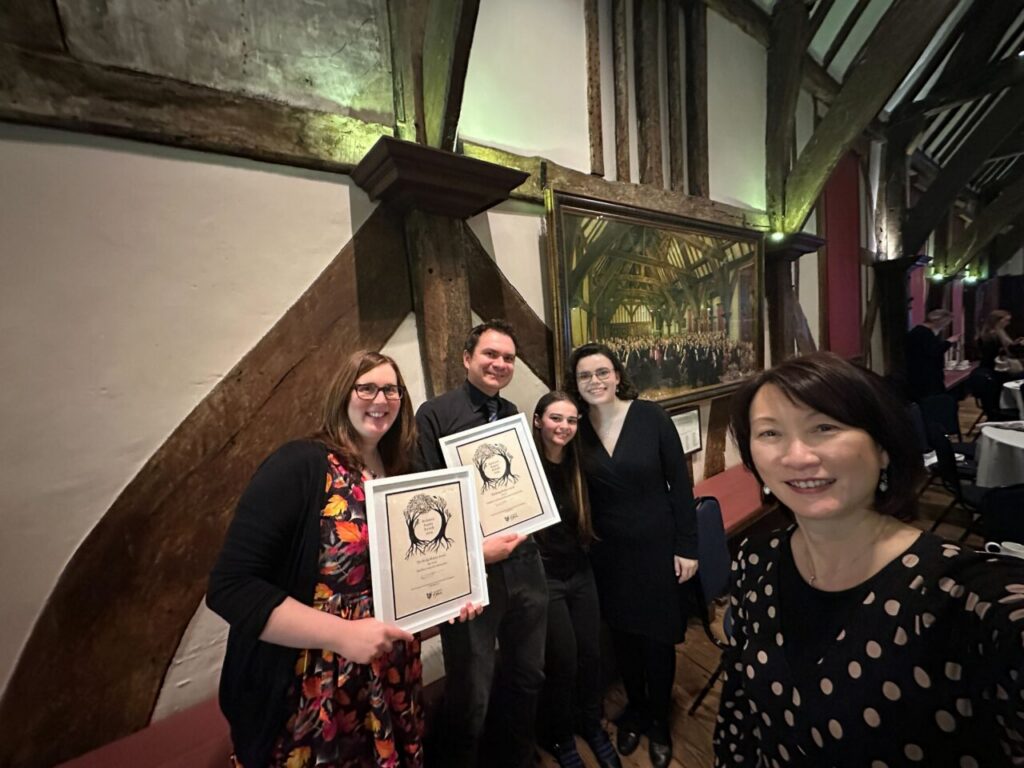
And it is exactly this gap which the project hits which has resulted in it being awarded with the Bridge Builder Award at the University of York 2025 Impact Awards. This award recognises work that spans teaching-research-practice divides and that ‘demonstrates education is an ecosystem, not a hierarchy, acknowledging the interconnected value of all university roles’. At the time of writing the Toolkit has been accessed by 453 unique visitors online, and elements have been integrated into staff training and workshops at the University of York. We are currently working on other ways to expand impact, such as this blog post, creating a published article and converting lessons from the Toolkit into additional resources, such as training slides and informational posters for people to use in lab spaces.
It is my hope that this blog and the Toolkit will inspire people to actively engage with disability and accessibility when planning and designing research projects. To finish with another remark from Isabella, “ultimately, accessibility is not something which can be achieved passively. It has to be an active and collaborative effort, with education and awareness at its core, through projects such as this Toolkit”.
A special thanks to Dr Alexander Reid for providing key technical insights and editorial support for this article.
The project team who created the toolkit are: Postgraduate Interns: Grace Davis and Niamh Malone, with Poppy Fynes involved in latest updates. Undergraduate Interns: Isabella Brinton; Amy Cavaliere; Rachel Coldwell; Hester Davis; and Jas Reynolds. University of York staff: Dr Alexander Reid (Psychology Department, Project Lead); Dr Amanda Hickey (Psychology Department); Lilian Joy (Digital Accessibility Manager); and Alice Bennett (Digital Accessibility Unit).
The Jisc Accessible Maths working group started in 2021. It was formed from a small group of people in the Jisc Accessibility Community who showed interest in working on this topic and were mostly NOT maths lecturers but a mix of learning technologists (LT) or people with accessibility roles. After Fiona McNab, our first chair, left for the private sector, the group was chaired by Lilian Joy (York) and Jenny Hughes (Sheffield) who started the mailing list and grew the number of attendees from HE. They then handed the reins over to Cordelia Webb (Leeds/Edinburgh/Imperial College) and Luke Seale (Southampton) in 2024. Under Cordelia’s leadership the group has now grown to encompass many more universities and strategic contributors such as members of the LaTeX project. The group now has a Google site with resources, minutes and recordings so everyone can benefit from knowing about what we’re all working on: Jisc Accessible Maths Working Group site. As the group grew bigger, it became harder to ensure we could help newcomers to understand the world of accessible maths. Attendees with an accessibility or learning technology background sometimes had difficulty following along with some of the more technical or mathematical discussions. Some of the learning technologists who have worked in accessible maths for a longer time got together to discuss how we could create a Learning Technologist and Accessible Maths mentoring group. We’re pleased to say we have a framework for LTs to feel more supported in the world of accessible maths!
We have meetings about every 8 weeks and discuss what we are grappling with and seek each other’s advice on how to help academics to make their content more accessible when we are not experts in their subject. Some of the things we’ve discussed include
Feeling professionally exposed and vulnerable – not an expert in STEM but working with experts in STEM.
How to upskill ourselves so we can speak the ‘language’ of the people we are supporting.
How to get started with some of the jargon and tools.
We are starting to grow our numbers so the challenge will always remain: how to enable new people to join and get going, while helping those further on in their journey to progress. I wrote about my accessible maths journey as a learning technologist to provide some kind of map for others who don’t know where to start – I certainly didn’t! A group consensus has been that you just need to start with one academic or one student and learn all you can about their workflow. From there, you have a point of reference to grow your own knowledge and skills. It can feel messy so having a glossary on hand to refer to and making your own primer for accessible maths can be a way to make sense of things.
I’m envious of universities with departments that have mandated that they produce HTML notes for all students. In theory, that must make it so much easier for a Learning Technologist! However, there is also a benefit in keeping a more ‘messy’ eco-system, but with a key principle: whatever format an academic is working in, can they easily create an alternative format for a student when they want it? The reason I stick with this mantra is that over the years, I’ve seen how resistant people can be to changing tools and this one consideration can sometimes be the thing that helps them see the benefits of trying something else. Also, we know students come with all kinds of preferences and not everyone wants ONLY a HTML site of beautiful notes; they may want something they can easily keep offline or make their own notes on. For some students, that is still a PDF, and for others a Word document.
I’m very grateful that we have a group who can work these things out with each other. Our identity as learning technologists blends pedagogy and technology with a student-first mindset, enabling us to help academics teach more inclusively and accessibly. We may not know the maths, but we can help to work out a good workflow that brings benefits for everyone.
As a small team working to spread accessible digital practice far and wide, we’re always collaborating with colleagues across the university (and beyond!). We’re delighted to share a post from a guest, Katie Vernon, Graduate Engagement Lead for Open Research and Postgraduate Researcher in the Centre for Medieval Studies, outlining how open research and digital accessibility have shared aims of breaking down barriers that individuals face when accessing and engaging with research.
Definitions
The ideal for open research is to make as many parts of the research cycle as open as possible or, in other words, to make research free and easy to access to anyone using the internet. The Open Research Toolkit provides an overview of practices and principles which can be applied to projects across all disciplines and at different stages, including:
Pre-project: sharing aims and questions through open access protocols, preregistration and registered reports.
During research: participatory research collaborating with communities, or an open notebook and open data to share the project’s materials and activities.
Post-project: publishing academic work openly, sharing code, and engaging with open peer review.
Digital Accessibility aims for digital content, on and off-line, to be easily viewed, used and understood by everyone. Everyone’s accessibility needs are different and can change over their lifetime. However, there are principles and guides to making content accessible and these should be considered from a project’s inception. For instance:
Webpages need structuring with a clear pattern to the information displayed, including formatting with headers, content sections, and weblinks.
Content needs to be navigable by assistive technologies. Screen-readers are commonly used by people with vision impairment or with specific learning disabilities like dyslexia and so documents need to be clear and in a machine readable format.
Benefits:
Breaking down societal barriers
As open research is freely available to all, without paywalled access, communities and individuals who do not have academic institutional access are able to read research. Disabled people may be more likely to take breaks from their studies, but open scholarship means that journals and monographs are available during breaks from education.
The first principle of Open Research is accessibility, and to be equitable, accessibility should not just mean available online. As digital outputs, open research can be quickly and easily made accessible, formatted for a variety of readers. Digital accessibility: a Practical Guide offers guidance on how to format work with many users in mind.
Impact and reach
Making open research digitally accessible allows for work to be shared quickly and with a wider audience. It can reduce workloads, as staff are unlikely to need to make changes to documents for teaching or research purposes, as such open and digitally accessible research may receive more citations.
Open source software and open educational resources provide free tools which support education and research. Assistive technology through Disabled Students Allowance or Access to Work can take time to be arranged, be expensive and time-limited if subscription models are provided by funders. As such, open tools and resources may be a better option when it comes to supporting researchers and educators, although users need to be aware that these tools may not be formally recommended by the University – see Accessibility tools and support: Unsupported digital tools. An exception is Non-Visual Desktop Access (NVDA), an open source screen reader supported by the University.
Open educational resources can be used for impact and public engagement. In her Open Research in Practice case study describing the Romans at Home project, Eleanor Drew, former Digital Heritage MSc student, described how she created open educational resources to help bring archaeological research to those who are unable to visit museums. Romans at Home was a collaborative outreach project with York Archaeological Trust (YAT) which used a multi-sensory approach, using readily available materials like sage or olive oil, to explore aspects of Roman life in York with people living with dementia.
Equitable Research
Using participatory methods and collaborating means research can be more equitable and representative. The DISCO (Disability Community) Project offers guidance on including disabled people in research and building community for disabled students. It provides a toolkit for including disabled people in research and guidance on creating inclusive events. Working with communities allows those who are impacted by or have an interest in specific research to access information and be involved in the processes.
In her Open Research in Practice case study, doctoral student Elizabeth Richards describes how she supported students with Special Educational Needs and Disabilities (SEND) through collaborative practice. Embedding open research principles into each stage of the project, Elizabeth created a study involving local schools. Elizabeth’s case study also speaks to some of the challenges of open research when working with sensitive data.
Compliance
Funders, for example UKRI, require certain publications to be freely and immediately available under a suitable open access licence. Open research allows publicly funded research to be accessible to the wider public. However, digital accessibility would ensure that these works can be accessed and used by a wider public. Digital accessibly may also be required by many potential collaborators, such as public bodies or EU funded projects. The 2025 European Accessibility Act means that if digital work is to be shared, and especially sold, to members of the EU then it must comply with certain standards. Meeting these requirements is increasingly important within and outside of academia and ensuring research is digitally accessible means that it will be more likely to be usable without changes to the work in future.
Inclusive digital practice sends the positive message that your organisation values everyone it engages with.
The National Lottery Fund has a guide to online accessibility, which is especially tailored to heritage organisations. While not all elements of digital accessibility are required, as they state: “people recognise good accessibility, sites with poor accessibility will stand out. They will appear unprofessional and will reduce your organisation’s potential audience and support base.”
Practical steps:
Take time to reflect
Consider the audience of your research, their needs and representation:
Those with specific learning disabilities might need clarity and structure in academic feedback processes. Open Peer review provides an opportunity for more transparency between researcher and reviewer.
Public engagement can connect with marginalised communities and provide representation of researchers with disabilities and projects which speak to disabled people’s experiences.
Keep it simple
Use software which is familiar to a wide range of users:
Many types of software now have inbuilt accessibility features, such as voiceover on Mac or PDF annotation on Edge.
Try not to use proprietary file formats, which might require a subscription and have fewer in-built or compatible accessibility tools.
PDFs are a popular format with a range of free compatible tools and so many users will be able to access and navigate them on and off line. However, older PDFs may not be digitally accessible, with difficult to read serif fonts or blurry scans, so, in teaching, use modern high-quality versions.
Powerpoint and Google Slides are both potentially accessible and easily converted.
Format your work
Take responsibility for ensuring that research outputs are accessible:
Include formatting like alt-text, colour contrast and title headings. These features are commonly missing from publications but are a quick addition for an author to make.
Ensure that the whole document is formatted correctly, including appendixes and tables. Postgraduate researchers should make their thesis accessible in line with formatting guidelines.
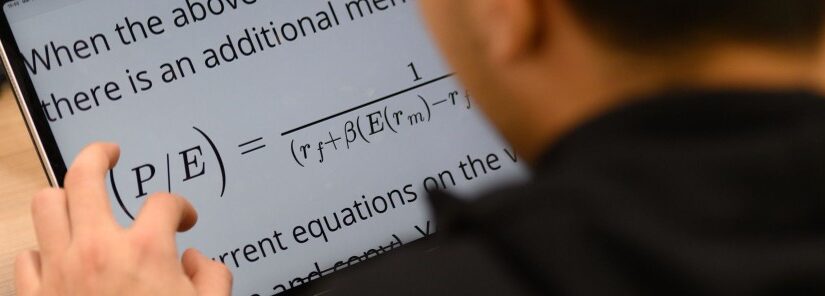
Screen readers struggle with mathematical equations on documents like PDFs, so convert work to LaTex, a template of open source code for which is offered by the University’s Digital Education Team.
Be aware that screen readers can also struggle with texts that use multiple languages, manual language tags can help with this.
Use free templates available for making accessible Google websites on Google Workspace: a Practical Guide. A website should be able to be navigated with a keyboard or using speech recognition software.
Use a repository with built-in accessibility controls:
Ensure that your deposited work is an accessible copy.
White Rose Research Online has a guide on its accessibility options, but this is currently being reviewed and updated. As it notes, their PDFs, especially older files, are not always in the scope of accessibility regulations because the site hosts user generated content.
Contribute to future change
Think about which publishers you submit research to and work with:
Consider if the publisher provides digitally accessible as standard.
If you are an editor, ensure that submission guidelines include accessibility requirements, as research shows that this is rarely outlined. Such guidelines may reduce later workloads and attract submissions from a more diverse range of researchers.
Conclusion
Open research and digital accessibility are both a means of making information available and understandable to a range of audiences, especially those who might face institutional and societal barriers. When practicing open research it is important to consider digital accessibility from the inception of the project through to the completed work.
Wednesday 25 February 2026, 2pm to 3.30pm, in person in Spring Lane Building SLB/105 We’re running another workshop designed to help University of York teaching staff better support students with low vision, outlining the different ways teaching materials and digital practices can be made more accessible to low vision students. The session will cover key considerations for staff to make the necessary adjustments to their practice to better include low vision students and provide them with accessible digital materials. University of York staff can book a place here.
Alice and I have been exploring how to structure workshops to help staff learn about supporting our vision-impaired students. We’ve tried various formats and this blog post discusses our most recent and practice-focused workshop format. If you want to find out about our previous workshops, feel free to look under the category ‘workshop’ in our blog site.
We had a small group of 6 lecturers, technicians and support workers attend the workshop. Tables had been set out with different materials on them so that workshop participants could go around them in pairs to try out the equipment or discuss the resources. Staff had a go with a Perkins Brailler, a refreshable braille display, a geometry mat with embossing film, a braille labeller and a slate and stylus. They discussed the tactile materials on the tables, from home made graphs to 3D printed materials from the Tactile Universe project. To showcase our braille embosser (the ViewPlus Spot Dot) available to staff and students, we put out printed samples for discussion.
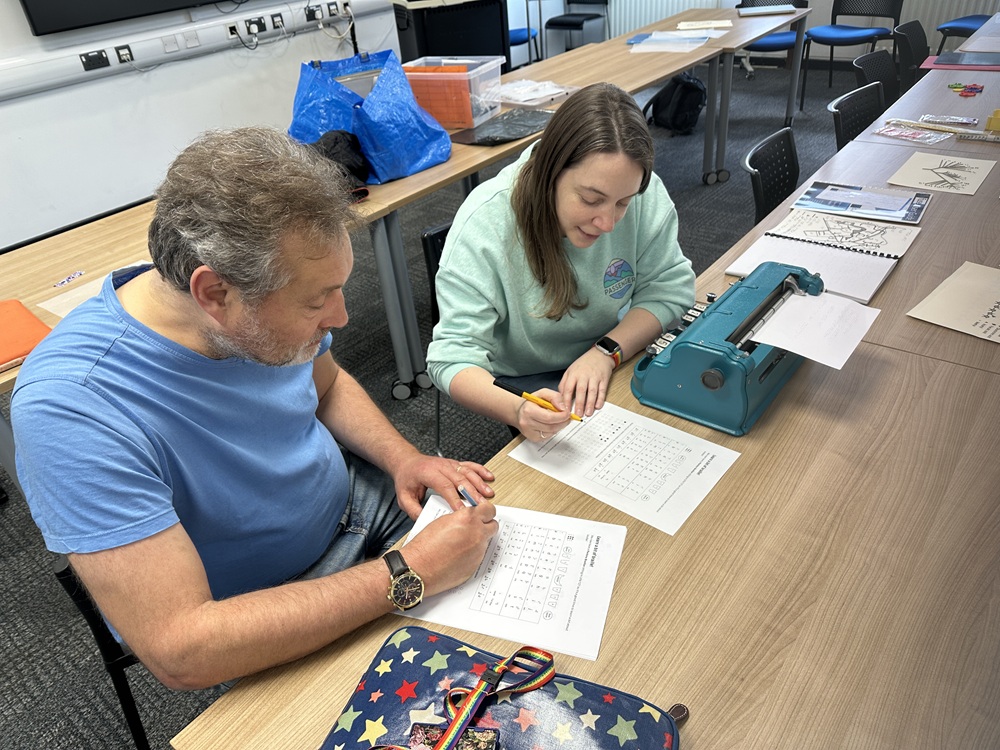
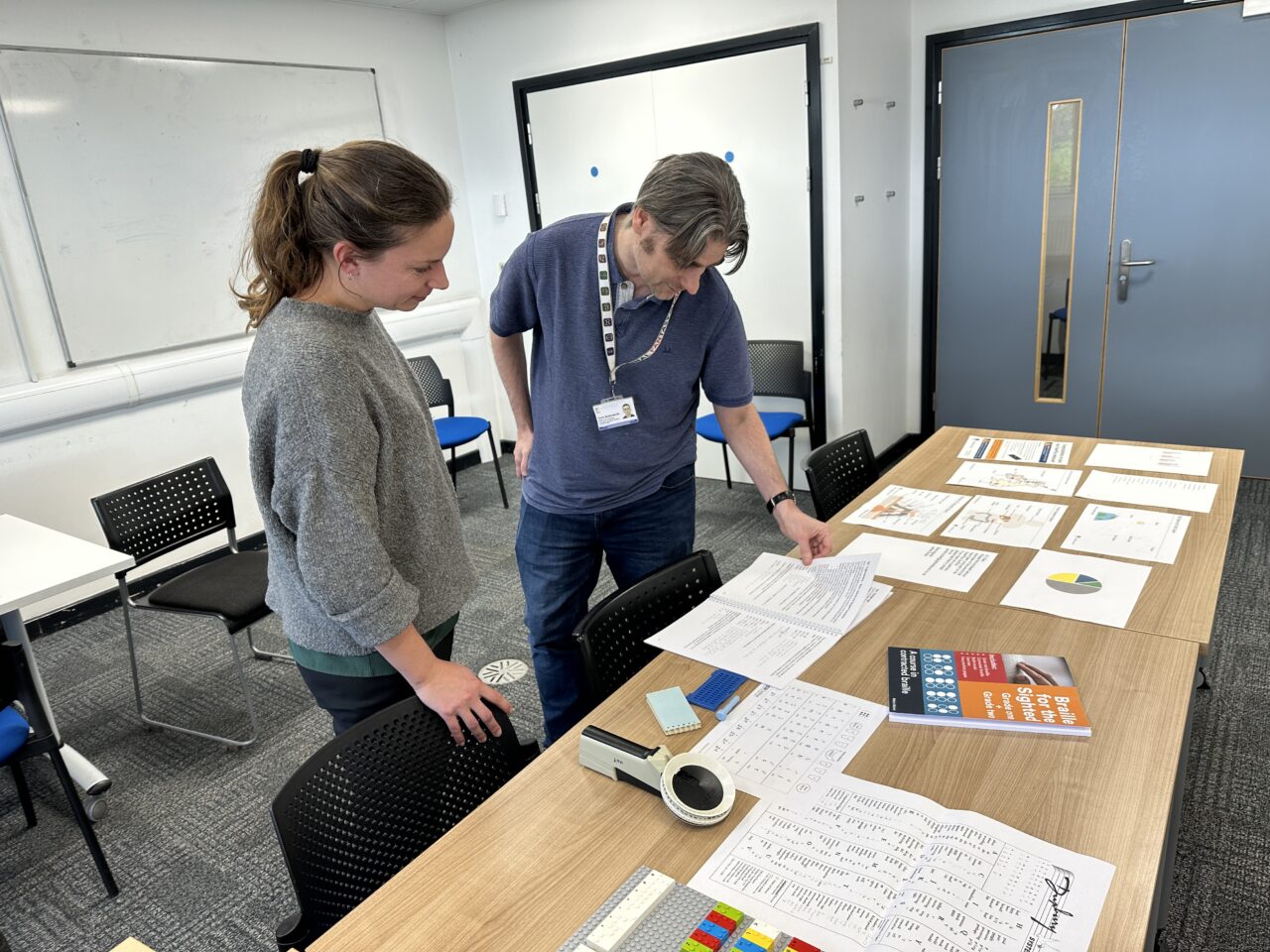
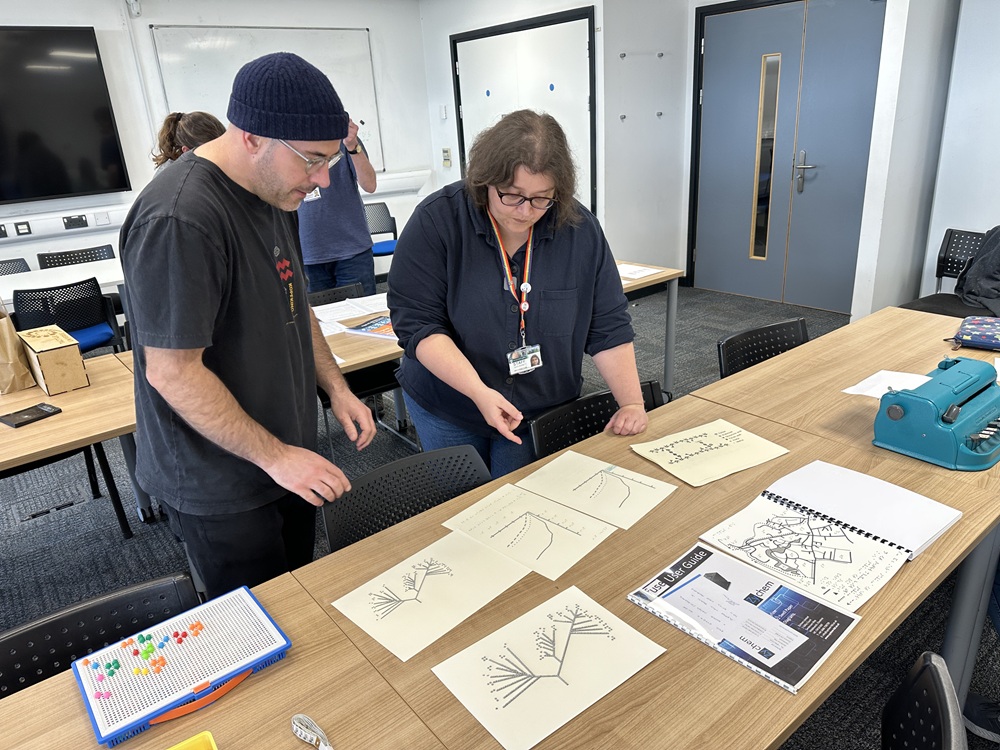
Staff working out the braille for their names on paper before typing it on the Perkins brailler.Staff looking at the UEB guide for Maths and discussing the complexity of understanding STEM materials in braille.Craig and Alice discussing the pros and cons of tactile materials generated with a PIAF tactile image printer.Staff having a go at ‘reading braille’ with a refreshable braille device.
The 1 hour workshop format seemed to go well although an extra half hour would have been ideal to give us more time for the hands-on experience as well as discussion.
Here are some of the questions participants asked followed by the answers and further links:
Is there a separate braille alphabet for other languages?
French braille is the basis for most languages based on an alphabet.
Braille is a code with only 6 dots used in different permutations to represent letters, numbers and punctuation. A raised dot 1 represents the letter a. Dots 1 2 represent the letter b and so on. Where languages use the same alphabets, the code is the same.
Languages that aren’t alphabetic have also mapped their own braille codes using the 6-dot principle. There are also separate braille codes for maths, music, chess, science etc.
How are numbers shown when they seem to be just the letters a to j?
Sometimes it takes more than one cell to represent something eg it takes two cells to represent the number 1, the number indicator followed by dot 1. See Deciphering the code for more information.
It’s similar to how we sometimes have to press two keys, the Shift key and the letter a, to create a capital letter A. In the same way, braille uses a cell in front of another to modify characters.
Dot 6 before a letter indicates a capital letter.
Dots 3456 before letters a to h indicate numbers 1 to 9, with j representing zero.
Some symbols take several cells in braille!
What about passwords?
Passwords usually have to be typed in such a way that one cell represents one character. For this, people will use Computer Braille, a way of doing letters, numbers and special characters in one cell each. This requires them to use 8-dot braille rather than 6-dot braille.
At one point, there were different braille standards around the world just for English! In the UK we used Standard English Braille (SEB) until 2011. We now use Unified English Braille (UEB) along with several English-speaking countries.
Students coming to university now aged 18 or older may have stuck to using SEB through school. Others may have switched to UEB. It’s important to know which code a student is familiar with before transcribing anything.
Are AI glasses any good?
We’ve heard mixed reviews, but it’s still early days so things may get better. AI glasses or Smart glasses are wearable technology that can help blind/low vision people to identify their environment, objects, people, images, colour and text. Examples are Envision glasses and Ray-Ban Meta glasses. As the technology develops, it’s an exciting development that could create more independence and help people with cognitive needs as well as sight loss.
One participant explained how asking ClaudeAI to describe images has helped reduce the time it takes to transcribe things.
One of our blind students uses a weekly schedule prompt with ChatGPT to organise her classes and other commitments as a text file. It has also helped with learning as she can feed it the format of her transcription notes so things are explained in a way she can easily perceive and reproduce on her refreshable braille display.
At the Uni, we recommend using Gemini or NotebookLM if anyone is going to try AI as assistive technology for the first time. This is because as a University using Google systems, we have contracts with Google that ensure our data is not being used to train their AI systems. Find out more about AI use at the University of York.
I would find it helpful to understand how a VI student navigates teaching materials (on the VLE) and the challenges they face/what works well for them.
Our blind students are less likely to use our Blackboard VLE directly. It can be quite a high cognitive load to navigate to what they need. Instead, their readings are usually provided for them by the Alternative Formats team via a Google drive folder. Their note-taker will also ensure any learning content is added to a Google Drive folder in a format that works for them (usually rtf). Regular meetings with a student will help them further and also help you to work out what works best. Depending the module content, it can take a bit of trial and error. It may be worth watching the recording of our webinar on Preparing to teach VI students (UoY sign in required) where a couple of lecturers explained what they found helpful.
This doesn’t mean you don’t need to make your content accessible on the VLE. In fact, anyone helping our blind students (note takers, for example) rely on accessible resources as the starting point. If your content is not accessible and well structured, it can hinder everyone, including our vision-impaired students. Find out how to make your content accessible and structure your VLE sites.
If I wanted to include Braille on my tactile resources, I’m not sure how I would check that what I wanted to write was correct, or which Braille language would be the best to use.
One way to ensure the correct braille was added is to co-create them with the student who can generate the labels themselves. You can also check with the Digital Accessibility Unit on the format you are planning to use and they can help ensure you have the software for braille translation and the correct settings. The DigAcc Unit can help with some resource creation if enough notice has been given.
In 2026, we’re planning to create a Braille Club with UoY students and staff who want to learn a bit more about reading and creating braille. Contact the DigAcc Unit if you’re interested!
Conclusion
Participants appreciated seeing examples of the resources and the braille keyboards students are using and meeting the people who work closely with VI students. They agreed that the workshop had given them an awareness of how much longer it takes for a student to read, write and process information.
“My first time trying to write in braille! It also gave me a greater appreciation of how hard it can be to directly translate maths / technical language into Braille.”
“There is always more we could be doing to facilitate learning.”
The Digital Accessibility Unit is 1! We were formed in late 2024, so we’ve just completed our first full year and wanted to share a few stats and highlights from our first year:
Our blog – Lilian posted our inaugural blog post on 29th November 2024! Since then we’ve published 13 more blog posts, including posts reflecting on events, our work and hot accessibility topics.
We’ve run 4 workshops and 2 webinars on supporting students with vision impairment (VI) and hearing impairment (HI) – these were co-created with students to help inform staff about how to better support them.
We’ve co-delivered 21 accessibility-based staff training sessions and supported several colleagues to create tactile materials for our vision-impaired students.
We’ve closed over 410 salesforce cases since our queue was created in late November 2024.
We’ve updated the Digital Accessibility Tutorial, undertaken by over 3800 staff annually, including information about the European Accessibility Act in the latest iteration.
We hosted a DigAcc2025 conference hub in June, as well as both participating in the national event.
We were part of the university’s Neurodiversity celebration week in March and helped with ADHD awareness month activities in the library foyer and the YorkSU PG fair. We helped to run the Distractibles for staff and students, with over 120 attendances through the year and 111 members on our Discord server.
We participate in research on accessible maths as part of the Jisc Accessible Maths working group and run a separate meeting for learning technologists working in the area of Accessible Maths. We keep the Accessible Equations site up to date with new guidance on Coding and Data Analysis developed with the help of colleagues and students.
Our linktr.ee/DigAccYork has our key links including our Bluesky account (@uoydigacc.bsky.social). We work closely with other teams in the Student Success Unit to focus on the student experience and success. We’d love to collaborate with more people to capture your stories of making resources and practices accessible. If we can add value to your practice or project, please get in touch!
We often look for national or international days (or weeks, or months) we can tie in with to help promote our work as the Digital Accessibility Unit, as well as awareness of tools, training and services around digital accessibility. So as November rolled round, we knew UK Disability History Month was the next big calendar event in this field, so I went to check the theme and this year’s dates. This year’s UK Disability History Month will be running 20th November to 20th December and the theme for 2025 is… Disability, Life and Death. Ah. Not the best topic to tie in with to promote Digital Accessibility.
So where is this blog post going? If you’re worried I’m going to try to promote digital tools as helping make things “dead easy”, don’t. I do love a pun but that isn’t where this is headed. Stay with me here…
Disability History is a challenging field. It is a history littered with prejudice, mistreatment, violence and organised attempts to eradicate disabled people. It is painful, difficult and immensely important to remember. Part of that is the importance of recognising and remembering those past, but another part of this is the importance of highlighting persistent prejudiced attitudes and practices today. The philosopher George Santayana said “Those who cannot remember the past are condemned to repeat it” and this is a history we cannot risk being forgotten and cannot allow to be repeated.
And whilst that might sound hysterical, it is striking to note how late legal protection of the rights of disabled people was enacted and globally how many disabled people are still living without that protection today. Whilst disability history stretches back as long as humanity (we’ve always been here), disability civil rights and the eventual passing of anti-discrimination legislation is surprisingly recent. On a personal level, I find it sobering that the UK legislation which protects my rights as a disabled person (the Disability Discrimination Act 1995, later superseded by the Equality Act 2010) has been passed within my own lifetime. Nor are the rights and services currently available to disabled people in the UK assured.
The government published Pathways to Work: Reforming Benefits and Support to Get Britain Working Green Paper in March this year, which outlined the biggest recorded cuts to disability benefits in the UK. Although after strong public objections part of this have now been rolled back on, the risk of cuts still looms. The Department for Work and Pensions (DWP) has refused to rule out spending cuts to personal independence payment (PIP) following the review, raising concerns that PIP will be harder to apply for and many disabled people currently reliant on PIP will no longer be eligible. Other groups have been more vocal about their opposition to disability benefits. This month the Reform party announced plans to drastically reduce disability benefits, making some claimants ineligible based on diagnosis and with the Reform party welfare spokesman accusing many of those currently receiving disability benefits of “gaming the system”. As disability benefits claimants are being styled as burdens on taxpayers, this begins to echo some of the darkest chapters of disability history.
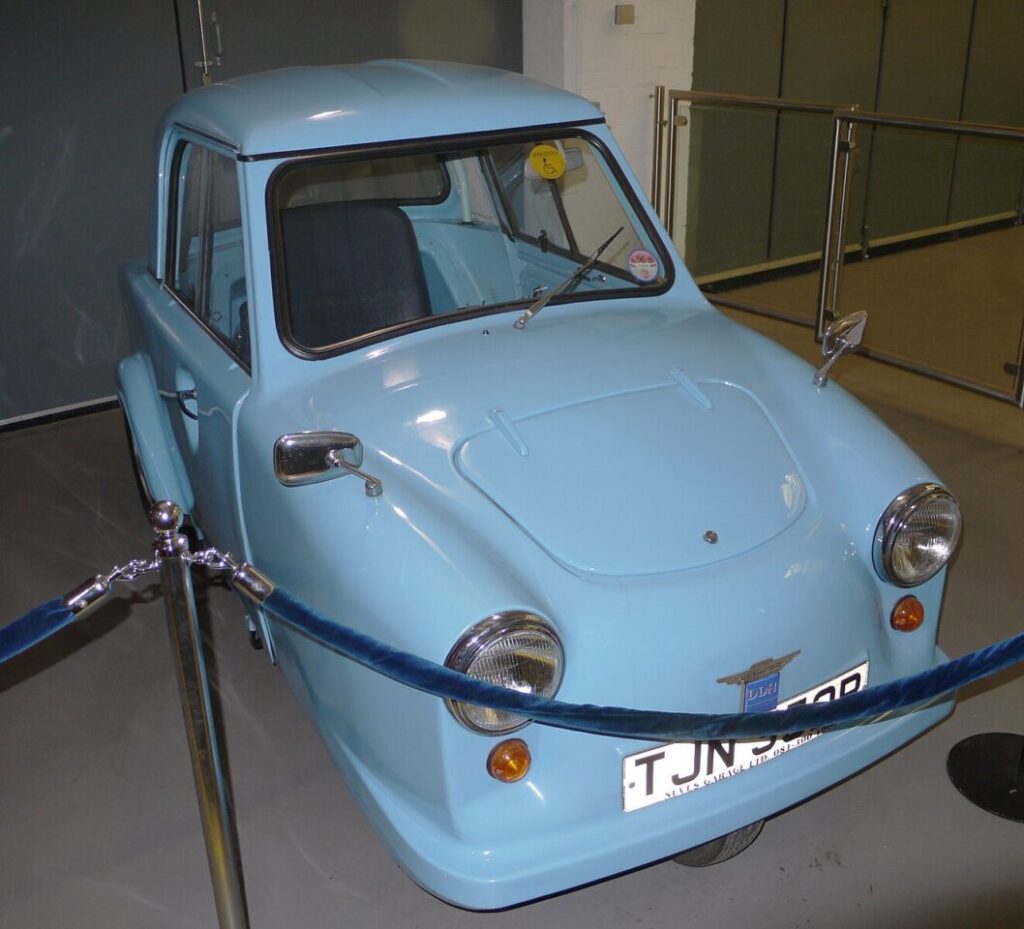
An example of an invacar – in a museum, where it rightly belongs.
Their spokesman went further, also attacking the motability scheme and advocating for the return of the three wheeled invacars for disabled people in need of vehicles. Ugly, capable of only short distance travel and with only a single seat, the invacar (the abbreviation making a marginally better name than the full title of “invalid carriage”) has not been produced since 1976, recognised as stigmatising its users and failing to meet their needs. Furthermore it was dangerous – small, poorly balanced on three wheels and built cheaply without crumple zones – it would completely fail to meet the road safety standards required in the UK today. The suggestion that we return to these is both punitive and dangerous. The invacar should be consigned to disability history, not proposed as current policy. The controversial Terminally Ill Adults (End of Life) Bill is against this backdrop of proposed cuts, with many concerned that without proper support available, disabled people could be pushed toward the option of assisted suicide. This blog post was written before the UK budget announcements, and the budget may have further specific impacts on disabled people.
Last month, the Conservative party leader Kemi Badenoch announced that Conservatives would take the UK out of the European Convention on Human Rights (ECHR), if they win the next election. Although the areas of policy mentioned in the reasons for this did not include disability legislation, the removal of human rights protections as a whole does make life feel more precarious for minoritised groups. In this case, it paves the way for the potential removal of legal protections on which many of us rely. Other parties have decided waiting to win an election may be too long to wait and have tried to push the issue – on October 29th, the Reform party leader proposed a bill for the UK to leave the European convention on human rights. Although this was easily voted down by MPs, the proposal and the number who voted in favour does illustrate how many members of parliament are willing to remove human rights protections.
All in all, this creates an unwelcome atmosphere to living as disabled person in the UK today. It feels like an increasingly hostile environment.
So this is where we get to the digital accessibility bit (still here? Thanks for staying with me!). In the face of global and national issues, we can feel helpless. Where do you start? What can an individual do? Having a small concrete action you can take is important. Digital accessibility is unlikely to resolve the biggest issues around disability, life and death, but it is a way in which you can show consideration to disabled peers, friends, family and colleagues. Being more inclusive in our digital practice is something we can all do, both in our personal lives and in our workplaces. It’s a small way of making the world more inclusive and of making that hostile environment a little less hostile to disabled people. Whether or not it is an adjustment that we might need as disabled individuals, seeing that someone else has considered accessibility, has anticipated the participation of disabled people, has tried to make things more accessible – we can feel more recognised and included.
So no, this year’s UK Disability History Month is not a time to promote particular assistive software or accessible features, but it is a time to reflect on how we respond to a painful history in making a more inclusive society and digital accessibility can be a part of that. Disabled people have always been here and we’re part of the digital world too. Digitally accessible practice recognises we are here and helps hold that space for us.
And let’s end this post by highlighting how you can use disability history to explore improving digital accessibility and disability identity:
First up is a blog post from Dr Josh Lim, at the University of Bath. How technology and design shapes digital access offers a great potted history of digital accessibility, which helps us reflect how far we have come and how far we still have to go.
Banner image from the Disability and Neurodiversity: Joy and Justice online resource
Second is a wonderful resource from a University of York student, Angharad Stables, who curated Disability and Neurodiversity: Joy and Justice – and we could all use some more Disabled Joy in the world! Angharad was one of the University of York library’s student curators this summer and created this brilliant digital resource. Angharad also writes about the experience of curating this in this post from the University of York library blog.
The Jisc Accessibility Community ran a Drop-In on the 1st October entitled ‘Braille Matters’. We had a very enlightening presentation by Elizabeth McCann from the Scottish Sensory Centre, introducing the history of braille and why it is still important despite the prevalence of digital technology. I was invited to give my perspective as a learning technologist working with vision-impaired students at my university and I did this by answering some questions which are detailed below.
The first blind student I worked with was so good at braille I didn’t even think about learning it. Instead I focused on accessible maths or ways in which maths could be converted more easily into single line maths. With a braille display you only get one line of characters; you can’t access ‘laid out’ maths.
The second student I worked with wasn’t so confident with braille, but likewise needed to be able to do quite a bit of maths in her discipline. I really wanted to help her with her braille and screen reading technology. This led me to at least try to bridge that gap and it started me off learning as much as I can about braille.
It’s not the first time a student has explained to me that it can be hard to learn maths if you only listen to it; students find that having something tactile (braille and diagrams) can help them to revise better and engage more with the content. It helps for them to have multiple modes of representation, just like for sighted students. As they don’t have the use of their sight, having tactiles and braille is really important.
How did you get started?
I think I looked at tonnes of web resources and realised how much memorisation was going to be involved. So I found an app called Braille Academy on my iPhone and in a weekend I had mastered the alphabet. I highly recommend this app for learning the braille code by sight.
I was frustrated at not having any texts to practice with though. I went around looking at any available braille in public or on the web but was frustrated by how much I couldn’t yet decipher because I hadn’t yet encountered contracted braille at the start. Not all braille is spelt out like English words-contracted braille are like short forms of characters or words to help reduce the length of braille. For example we use eg to mean the word ‘example’. Braille has lots of things like that. This does mean that until you’ve mastered grade 2 braille, you can’t always understand braille texts that you come across.
This led me on to the UEB Online website where you can learn to type braille on a normal laptop, turning the letters sdf and jkl into the 6-dots on a braille machine. To explain, braille is normally typed using a 6-dot device like a Perkins brailler or on some braille device. This UEB braille fingering chart shows how characters are normally input with 6-dots and UEB Online’s guide to using the keyboard explains it in more detail.
On the UEB Online site, you can practice reading braille, converting that into text and converting text into braille. I’ve finished module 1 and I’m working on module 2. I’m also loving the Braille Decoded app on my phone for practising reading and typing braille.
Braille Decoded reading exercise on the iPhone.
So you can type braille with a normal keyboard?
You can type 6-dot braille with the sdf and jkl keys if you are using UEB online, or you can switch on 6-dot entry with some software like BrailleBlaster. With the NVDA screen reader, you can use an add-on called PC keyboard braille input and that let’s you use the sdf jkl keys to imitate the 6-dot entry that someone with a braille notetaker would use.
I just want to make it clear that you can’t type English text, change the font to something like SimBraille and then think that’s ok. This would just be a font change for a sighted person – it might be useful if you’re learning braille by sight, but it doesn’t do anything for your braille student. You might as well just give them the digital file in plain English as they will usually have the technology that handles the conversion to braille.
For text or maths to be converted into braille that can be embossed by a braille embosser or read on a braille display , there is a converter called the Liblouis translator. This conversion is built-in with a braille display, on an embosser or in software like BrailleBlaster. You don’t have to download it or do anything yourself except to choose what level of braille you want it to output. You can set it to convert to Grade 1 braille, Grade 2 braille and so on. So you can give students an accessible digital file and their braille reader will usually handle the conversion into braille code. PDFs are not accessible for braille readers, fyi!
If you don’t know the braille, can you look it up somehow?
There are quick reference charts like the Hadley chart or the Aroga braille reference sheet or the Duxbury braille reference sheet. But there is no easy way to look up braille dots digitally, which is frustrating. If I come across some new notation in braille when my student is doing their maths, I can’t just look up dots 4 5 6, 2 4 6 and work out what that is. I’ve tried using google search or even AI but this fails terribly, so I wouldn’t suggest believing anything they offer you. So I rely on the charts or the manuals but it’s not easy to find what you need when it’s not always laid out to help you find the code.
Google search failing to deliver anything accurate about braille dots.
What’s the added challenge with maths and braille?
You can imagine what it’s like with the maths, even for sighted students, you have to get to know the various symbols, how they are laid out, how they are pronounced versus how the equation is read out. You have Greek letters and other symbols for vectors or differentials or matrices. Until you’ve learned that braille, you can’t ‘read’ the maths! And there are currently two different braille codes for maths. If you come from America, you’re likely to learn Nemeth Maths. In the UK we use UEB maths. So that’s another layer of ‘fun’.
In reality what works fastest for the learners I’ve worked with is for them or their transcriber to work with them to invent a way to represent new symbols. People suggest you could teach them latex since that is technically a single-line approach to describe the maths you want, but it makes it very unwieldy. You can’t just have a / for a fraction. You would have to read \frac which is about 6 characters in braille. When you only have about 40 characters available per line, it takes a lot of effort to remember everything in your head to visualise the equation, never mind then trying to solve it! Read more about this frustration written up by one of our graduates in An Accessible Maths Journey.
So do you think lecturers ought to learn braille?
It’s not necessary but it can be fun and it means you are showing an interest in the student’s way of working. I think it’s ideal if lecturers will co-create materials with the students so they can tell you what works for them. At a minimum, using the tactipad and a braille labeller can be easy for anyone to get started creating braille-labelled things. (See Prepare tactile resources if needed).
Can you tell us more about these tactile materials you’ve written blog posts about?
We encourage our lecturers to prepare tactile materials that can more easily explain complex charts or graphs. These can provide an alternative medium to understand concepts and it really is down to the preference of your learners as to what needs converting.
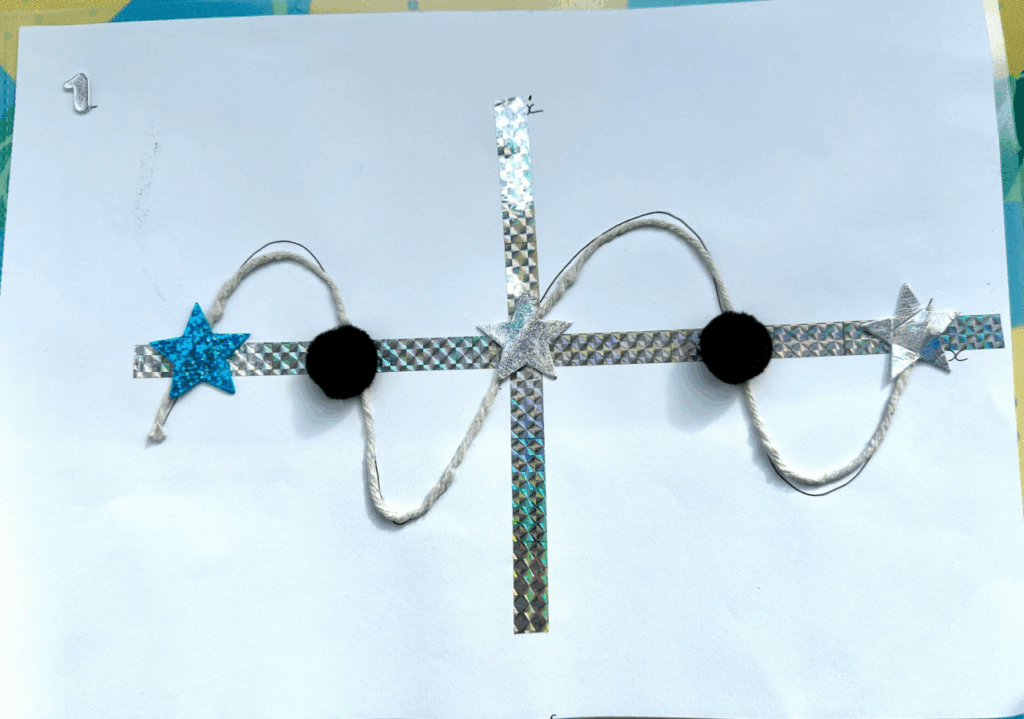
Previously we didn’t have a braille embosser so all content was either made tactile with a PIAF swell machine or by hand! See Creating tactile graphics for VI students part 1, part 2 and part 3. To help the lecturers understand how to work more accessibly with our VI students, I wrote a blog post about Preparing to teach our VI students and sent emails round to the lecturers. What continues to make me very happy and amaze me is how creative our lecturers can be when trying to make tactile graphics. The blog posts have several examples but the most recent example is a joy to behold; it’s fun to look at, great for textures and easy identification, and it has a number one on the top left so you can tell which way is up and which item it is in a series of 9 such diagrams! I hope they had a lot of fun making them because they were a real pleasure for our student to use in the lecture.
A colourful tactile graph made by a lecturer.
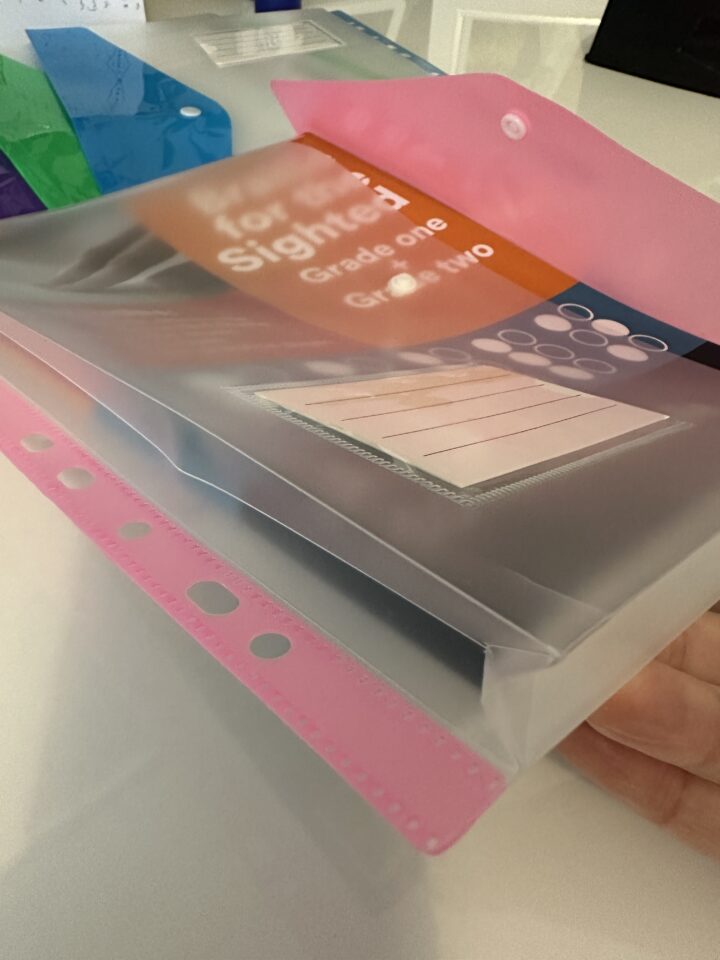
So the example above doesn’t have any braille labels on it, but the student can add these braille labels themselves or they can add a Penfriend label to record an audio description. (See Tools for creating tactile graphics). The only challenge with some of these tactile materials is storing them – they can be bulky to store or flatten over time if too much is piled on top of them. A student recommended these expandable hole-punched pockets to store their braille content. I haven’t found them in the stores, but I’ve managed to source some on Temu!
An A4 punched pocket file that expands for items with some depth.
So you now have a braille embosser? Will that speed up the creation of tactile content?
Yes, we now have a SpotDot embosser but we’re still learning to use it, and we have an added challenge. Most HE will end up with using a networked computer to print to the embosser – this means you can’t get to the printer settings if you don’t have admin rights. We haven’t solved that one yet, but we’re getting by in the meantime. Once I have learned more, I’ll write it up on our blog!
We went for the SpotDot because some students have some sight and appreciate being able to see large fonts or colours on the page as well as being able to feel the braille or embossed patterns. It’s also useful to have print on any embossed material so peers or helpers can understand what’s on the page.
The embosser is going to help us produce more professional looking resources for our students – I think I’ll miss seeing the creative outputs from our lecturers so I hope it will be a blend between the two. It’s also going to be great resource for our students who don’t always have a way to print their own notes out from their braille reader. Now they can emboss multi-line reference material to refer back to easily.
One of our students have their own Index V5 embosser so I’ve had to get to grips with that as well. It’s always good to learn something new!
Do you have any examples of how your students are using braille creatively?
My current student taught me about the braille slate (See Tools for creating tactile graphics) and I’ve been using mine to emboss labels on diagrams, but I was blown away by her weekly planning board in braille. It’s a cork board and there are braille labels for each day, arranged to remind her of the structure of the day. Things like ‘study’ or ‘lunch’ are timeboxed in there. Fixed labels have flat drawing pins and other labels have push pins. It’s an amazing example of her creativity that she can invent something she needs. I take for granted my ability to make notes in my bullet journal to help organise my week or my thoughts and this is how our student has created a similar tool for herself. What an inspiration!
A student’s weekly plan in braille on a corkboard.
What’s next?
We now run regular workshops for staff on creating tactile materials and we’ll be showcasing the equipment that we have to help them with this. Our students come along to the workshop and it can be a really good exchange and very educational! (See Reflections on our Supporting visually impaired students workshop).
I’ve been learning more about screen readers and braille readers and how to teach these skills as well through a great site called Eye.T Vision.
I’m going to continue on my braille learning journey. There isn’t a formal course that I can go on to become qualified without having to pay out a lot of fees myself, so for the time being, I’ll just carry on with the UEB Online courses and certificates. I am learning a lot from working with our braille users so I feel very privileged to be able to learn directly from and with them. I would happily run a beginners braille workshop for a bit of fun – it would give me an excuse to bring out my Lego braille bricks and other bits of kit I’ve been accumulating – learning braille can be a gateway to spending all my money exploring all the tools and technology that can help blind people!
17 September 2025 saw me visiting the University of Coventry for the Enhancing Inclusion for Neurodivergent Students in Mathematics and Statistics workshop. This was held in collaboration with the University of Bath and funded by the London Mathematical Society (LMS). The event was held at the Library, a wonderful building with silent and group study spaces, promotions for mental health and well-being, study skills, IT skills and home to the writing skills centre and maths and stats support centre (SIGMA).
Judy Hornigold, Independent Educational Consultant specialising in maths and learners with dyscalculia and dyslexia, introduced us to the key concepts of the day:
UDL principles can really help us prepare for our neurodivergent students – plan for multiple means of engagement, representation (text represented through diagrams, flow charts, mind maps or other visuals, videos etc), action and expression.
Tiny tweaks can make a difference. Digitally accessible documents allow for font and colour change. Provide notes in advance. Create materials with smaller ‘chunks’.
Highlight important points clearly (a callout in the notes for instance) and repeat important points clearly.
Make the abstract concrete through examples and tactiles where possible
A whole person approach is needed, not just strategies for someone to learn the maths and stats. Support students to develop a growth mindset, help them reframe anxieties and develop progress strategies. (The Maths Anxiety Research Group at Derby University.)
Students experience extra cognitive load and may have to ‘overlearn’ as one strategy that helps them to develop automaticity, something neurotypicals may take for granted.
After a break, we had short presentations from 3 practitioners:
A long-time contributor and supporter of the Jisc Accessible Maths Working Group, Emma has been a promoter of accessible maths for the longest time. She is also head of the Mathematics Resource Centre (MASH) at Uni of Bath. She used 4 student personas to explain how she approached adaptations to teaching for the various students’ challenges. Key to successful adaptations were using as many tactile and visual techniques as possible and encouraging the students to experiment to find out what worked for them. Her stash of manipulatives made me slightly jealous, as someone who is constantly collecting equipment to create a more tactile experience for the VI students I support!
Emma Cliffe’s store of tactiles for teaching STEM concepts.
Jonathan provided an entertaining and tactile insight into how Pythagoras’ theorem could be introduced and proved to anyone with sight impairments. He brought along some tactiles he had made and split us into two groups to solve the puzzle together. Playing with such tactiles can be very useful for vision-impaired students but it can also help neurodiverse students, turning abstract concepts into something concrete. The activity also illustrated how working in a peer group could help everyone with their maths.
The Mathsgear site was mentioned as a good source for more tactiles. I think the site is going to be a big drain on my pocket money!
Jonathan and his wonderful tactile Pythagoras ‘tangram’.
Jonathan very kindly provided a follow-up video after the event to demonstrate how the tactiles work. (Credit goes to Maurice Laisnez who found this proof in 1939.) Feel free to contact Jonathan about his tactiles.
Balvir Bains (Loughborough University)
With her experience as an engineer, Balvir is well suited to working with Sports students at Loughborough Uni who are worried about maths. She explains things in practical terms and with concrete examples to help students understand how the maths applies to what they are learning in their discipline, or in their everyday lives.
Other speakers and discussions
We had some lovely insights into the work of two of Coventry Uni’s specialist study skills tutors, Dove and Louise. It was really helpful hearing about their contact time with students and their varied approaches to supporting students. Empathy was the key message they put across, with the quote from Henry Ford:
“If there is any one secret of success, it lies in the ability to get the other person’s point of view and see things from that person’s angle as well as from your own.”
They introduced the idea of the Autism Wheel (so many people think of autism in terms of a spectrum) which can better encapsulate the range of traits that may be exhibited by different autistic people. They shared the irony of being so willing to help that you can overwhelm someone with too much variety and choice; less can be more in this case and small concrete steps are often best.
We had discussions at our tables reflecting on top strategies from our own practice. Jonathan very gamely held up our contributions for presentation to the room. Our top tips or takeaways were to make things concrete, provide 1:1 appointments, and to encourage peer support activities.
Jonathan gamely holding up our post-it notes from the table.
During Q&A, I asked if anyone had found the best font to support coding and maths. It’s a real dilemma for students who need to use a sans-serif font – they still need to be able to tell apart characters like the letter i, the letter l and the number 1 and a serif is usually the way you can do it. Some programming software will have syntax highlighting, colourising parts of code and that can be helpful. Jonathan very kindly followed up with an email sharing the Hyperlegible® font. It’s also available via Google Fonts.One of the best bits of the day for me was meeting Jonathan and Emma in person, two people I have worked with through the Jisc Accessible Maths Working Group over the years. Emma informed me that the sigma Network will be focusing more on the neurodiversity space for Maths and Stats now that the Jisc Accessible Maths Working Group is there to look after the ‘technical accessibility’ part. Both aspects need to come together in practice, of course. However, it makes sense to specialise and support colleagues in these two areas with specific advice where possible.
From left to right: Lilian Joy, Jonathan Fine and Emma Cliffe.
It was a well-organised event, with time for a visit to Coventry Uni’s sigma or Maths Skills Centre and networking. Many thanks to Dr Yamuna Dass and her team for organising a very fruitful workshop!
Having read this far, what are your key takeaways for supporting neurodivergent students in maths and stat?